Long-range imaging module
An 18× optical zoom module with a MIPI interface provides optical reframing without relying only on digital enlargement.

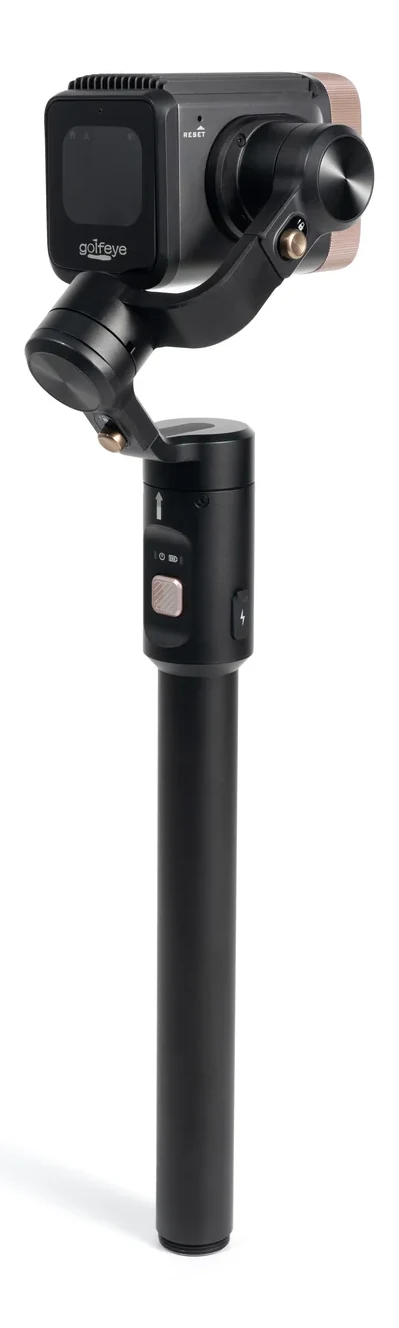
How the G20 hardware platform combines optical imaging, on-device AI compute, motion sensing, and motorized stabilization for golf capture workflows.
These specifications are taken from the Golfeye G20 technical dossier, revision 03 / 2026.07.
An 18× optical zoom module with a MIPI interface provides optical reframing without relying only on digital enlargement.
The Qualcomm Snapdragon QCS6490 platform provides 12.5 TOPS of edge computing capability for on-device processing.
A three-axis gimbal with three motor locks supports controlled camera orientation and stabilized capture.
An independent GPS module, three-axis accelerometer, and three-axis gyroscope provide position and attitude inputs.
Use Wi-Fi and Bluetooth to connect G20 with the Golfeye App, then check device status, storage, firmware, and the live preview.
Choose Automatic for standard golf shots, Putter for the green, or FreeStyle for flexible capture scenarios.
The 18× optical module, three-axis gimbal, GPS, and IMU form the documented hardware stack used by the camera during capture.
Browse recordings, download selected clips, edit, tag, export, share, automate highlights, or create live and replay rooms in the App.
| Parameter | Golfeye G20 | Specification Status |
|---|---|---|
| Imaging module | 18× optical zoom, MIPI interface | Confirmed in G20 dossier |
| AI processor | Qualcomm Snapdragon QCS6490 | Confirmed |
| Edge AI compute | 12.5 TOPS | Confirmed |
| Gimbal | 3 axes, 3 motor locks | Confirmed; angle and software limits require the final attachment |
| Position & attitude | GPS + three-axis accelerometer + three-axis gyroscope | Confirmed |
| Wireless control | Wi-Fi 6 + Bluetooth | Dual-band; Station and Hotspot modes |
| Capture modes | Automatic · Putter · FreeStyle | Documented in the Golfeye App workflow |
| Video resolution / frame rate | Not stated in the current dossier | Confirm against the final production specification |
| Ball speed / launch / spin accuracy | Not stated as measured outputs | Do not position G20 as a radar launch monitor without separate validation |
| Tracking distance / accuracy | Not stated in the current dossier | Validate at the intended site and capture scenario |
The systems serve different primary needs and may be used together.
| Deployment Factor | G20 Planning Guidance | Why It Matters |
|---|---|---|
| Camera position | Use the live preview to verify the target area before capture | Obstructions and poor angles can limit useful footage |
| Mounting | Three-part assembly with gimbal, extension rod, and ground spike | Stable assembly supports consistent capture |
| Deployed height | Approximately 1.3 m | Confirmed modular deployment height |
| Operating temperature | -10°C to +55°C | Stay within the documented operating range |
| Humidity | 95% RH @ 60°C | Environmental parameter from the dossier |
| Rain / ingress protection | No IP rating stated in the current dossier | Confirm protection requirements before outdoor deployment |
| Quantitative ball data | Use a validated launch monitor when required | G20 dossier does not publish speed, launch, spin, or carry accuracy |
Validate camera position, capture mode, target visibility, App workflow, and required performance in your actual golf environment.